Proxmox VE · Linux · Docker
No more
panels.
Proxmox VE, Linux, Docker and a real terminal in one native app.AI investigates and proposes. You decide what runs.

0
remote agents
Nothing to install on your servers
0
new open ports
Only the SSH and PVE API you already run
3
levels of AI permission
Ask, auto-approve reads, auto-approve known actions
BYOK
your own model API
Direct requests to your selected endpoint
Panels provide precise controls while AI connects evidence to the next step. ServerGO brings machines, terminals and conversations into one window, follows your selected resources and local permissions, and separates checks, approval, execution and verification.
01Interface
One window. Eight views.
From clusters to containers, processes to files — every view is native SwiftUI. No web wrapper, no admin panel to log into.
Everything collected from your Proxmox clusters and Linux hosts on one page — with the counting rules stated up top, so a guest reached over SSH is never double-counted.
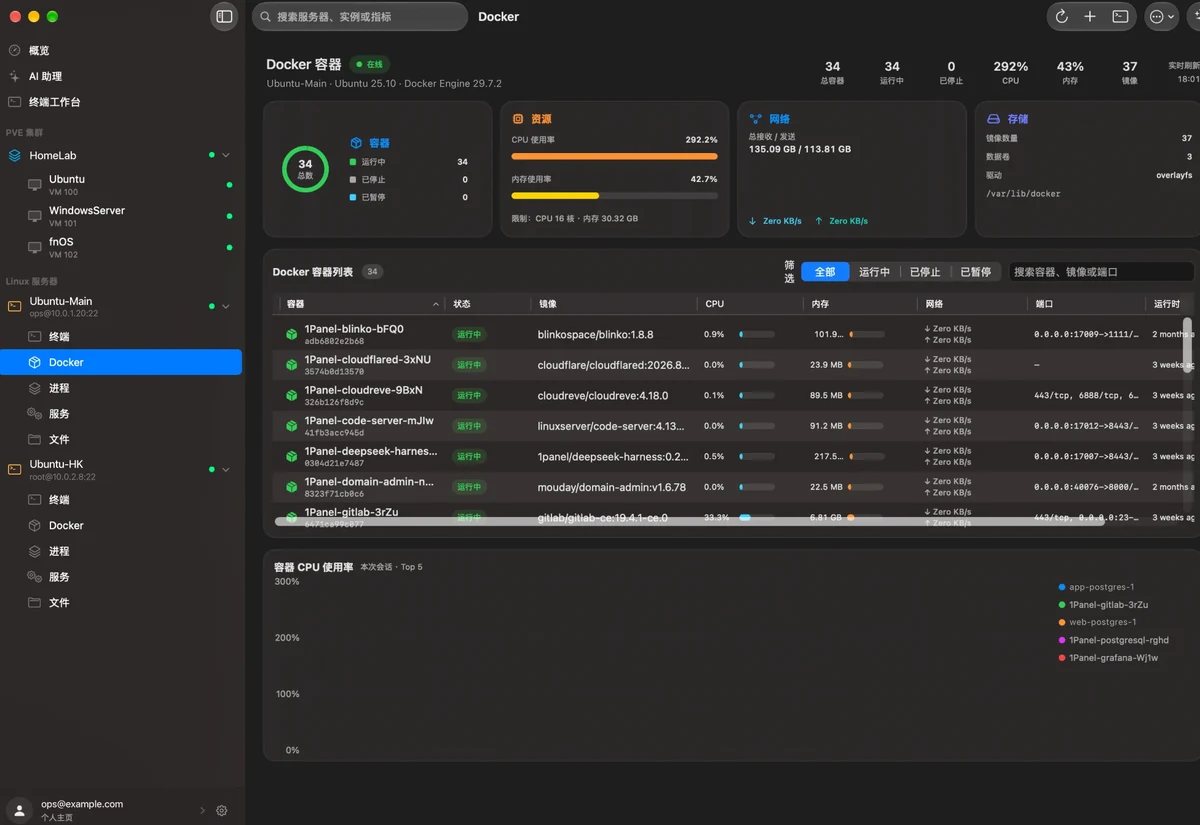
Real screenshots of the Chinese interface; host names, addresses and project names replaced with sample data.
02AI on-call
It investigates.
It proposes. You decide.
Bring your own model and API key. Context, checks and actions follow explicit resources and permissions; output, exit codes and verification remain distinct. The interactive example below uses synthetic data and connects to no server or command.
- L1
Ask for approvalApprove drafted SSH commands
Enabled fixed read tools remain available; drafted commands show target, content and impact before approval.
- L2
Auto-approve readsLocally recognized read-only commands
Changes and uncertain commands still require approval; a model's risk description grants no authority.
- L3
Auto-approve known actionsBound to resource scope and local rules
Recognized reads, package-index updates and structured restarts of authorized targets may run automatically. Deletes, compound and unknown commands require approval; sudo has a separate local confirmation.
What it won’t do
- Never touch a device you didn’t select
- Never ask for or print a password
- Never invent results — failed, rejected or empty is reported as “not checked”
- Never infer history from a single snapshot
Read-only checks · authorised for this turn
- Host metrics: CPU / memory / disk
df -h /- systemd and journal (last 15 min)
L2Waiting for your approval
sudo du -xh /var --max-depth=1 | sort -h | tail -51.2G /var/cache2.8G /var/log9.6G /var/backups61G /var/lib75G /var
Sample receipt · exit 0
03Terminal 2.0
A real terminal,
not a text box.
Both apps use SwiftTerm with raw bytes, split UTF-8, alternate screen, mouse reporting and bracketed paste. The terminal below displays preset sample output and runs no commands.
uptime
03:04:17 up 30 days, 4:12, 1 user, load average: 0.21, 0.18, 0.16
docker ps --format 'table {{.Names}}\t{{.Status}}'
NAMES STATUS
web-postgres-1 Up 3 weeks (healthy)
uptime-kuma Up 3 weeks (healthy)
caddy Up 3 weeks
df -h /
Filesystem Size Used Avail Use% Mounted on
/dev/vda1 40G 15G 25G 37% /
sudo systemctl reload caddy
[sudo] password for root:
Sent to sudo over stdin — kept out of replay, logs and AI context
Five built-in themes — try one
Native SSH and PTY
Mac uses native SSH and PTY adapters; iPhone uses NIOSSH and updates rows and columns with rotation and split view. Authentication and system SSH fallback depend on the installed version.
One terminal everywhere
Proxmox node shells, VM consoles and docker exec all run on the same SwiftTerm core.
AI CLIs just work
Claude Code, DeepSeek CLI and Kimi CLI run inside like any other program.
Secrets leave no trace
Passwords and sudo input never reach replay, logs or AI context.
04Honest status
No data,
no “healthy”.
Plenty of dashboards stay green when collection fails. ServerGO tells four states apart, never shows “healthy” on missing data, and states its counting rules at the top of the page.
Global health
No servers added yet
No sources, no verdict. Counting starts once you add a Proxmox or Linux server.
- Sources
- —
- Alerts
- —
- Total CPU
- —
Some sources didn’t report
2 of 3 sources collected; the HomeLab node API timed out. Totals exclude the missing source instead of assuming it’s fine.
- Sources
- 2 / 3
- Alerts
- —
- Total CPU
- —
No alerts in the data collected
We say “no known alerts”, not “all healthy” — we only vouch for what we actually saw.
- Sources
- 3 / 3
- Alerts
- 0
- Total CPU
- 20%
1 alert needs attention
Ubuntu-HK root disk at 92%, up 6% in the last hour. Hand it to the AI on-call for a read-only look first.
- Sources
- 3 / 3
- Alerts
- 1
- Total CPU
- 24%
Counting rule: Proxmox node resources plus standalone Linux connections; confirmed guest SSH is not counted twice.
05Security
The keys stay with you.
Local operations run on the client. Server authentication, model requests and account services have distinct data destinations.
Secrets in the Keychain
Passwords, tokens and model API keys live in the system Keychain — never in plain logs or preferences.
Direct, never relayed
Your device talks straight to your servers. ServerGO never sits in the path.
Host key pinning
Host keys are confirmed and pinned on first connect; a changed key is refused and flagged.
sudo over stdin
When elevation is needed, the password goes to sudo -S over stdin — never into the command line or a log.
Second confirmation
Shutdowns, force stops, deletions and snapshot rollbacks always ask twice.
No ads, no trackers
No advertising or third-party analytics SDKs are embedded in the app.
06Two platforms
Dense on the Mac.
Handy in your pocket.
Servers
HomeLabOnline
Ubuntu-MainOnline
Ubuntu-HKOnline
Docker
macOS 14+
A multi-column desktop layout with sortable tables, inspectors and context menus — plus the AI assistant with resource scope, tool evidence, permissions and operation receipts.
iOS / iPadOS 17+
A layered interface redesigned for touch: create VMs, manage storage and ISOs, and a terminal that keeps rows and columns in sync through rotation and split view.
07And more
The small things you use every day.
- Snapshots & backups
- Guest hardware
- noVNC console
- systemd services
- Service & system logs
- SFTP transfers
- API token sign-in
- Self-signed TLS, only if you allow
- docker exec
- 2 / 5 / 10 / 30 s refresh
- Command history & snippets
- Dark & light
08FAQ
Questions, answered.
How do I sign in or create an account?
Start signing in from Account Settings in ServerGO. Your system browser opens the official account page. Sign in or create an account with an email address or username, then return to the app. Email recovery is not available yet.
Do I need to install anything on my servers?
No. Linux and Docker use the SSH you already have; Proxmox VE uses its official API. ServerGO installs no agent, opens no new ports, and never installs Docker or changes user groups for you.
Will the AI ever see my passwords?
The app does not deliberately add connection credentials or sudo input to conversations. Models receive messages, relevant history and tool results within your permissions; check content you paste yourself. Credentials authenticate to the corresponding server or model API. See the privacy policy.
Why not just let Claude Code SSH in?
You can, and ServerGO’s terminal can run ordinary CLIs. The built-in assistant connects associated resources, collected evidence, current permissions and operation receipts. Unread data is not evidence, and associating a resource grants no execution authority.
Which AI models are supported?
The current version uses the model provider and API key you configure (DeepSeek, for example). The key is stored in the Keychain and requests go straight from your device to the provider you chose.
Does the phone monitor continuously in the background?
iOS limits background execution. Notification permission does not provide continuous sampling or cloud monitoring. This Alpha has no official continuous cloud-monitoring or remote-push service; check actual sample timestamps.
When can I get it, and how much will it cost?
ServerGO is preparing a public Alpha: a notarized macOS app and iOS TestFlight. Downloads are not open yet; installation scope, limitations and pricing will be announced with the actual release.
Is there a Windows or Android version?
Not yet. We’re focused on a native experience for macOS 14+ and iOS / iPadOS 17+.
Is ServerGO an official Proxmox product?
No. ServerGO is an independent third-party client and is not affiliated with Proxmox Server Solutions GmbH.
Your whole rack,
in one window.
ServerGO is coming soon to Mac and iPhone.